
Honey Badger DPS Meter.
A live combat band for Rust servers: DPS, headshots, last hit with body zone and range, your target's HP, accuracy and the weapon in your hands, on one painted band under the compass, measured from the damage that actually landed. One .cs file, no other plugins required, MIT code.
What a player sees
One band under the compass. Nine things on it, every one measured from hits that landed.
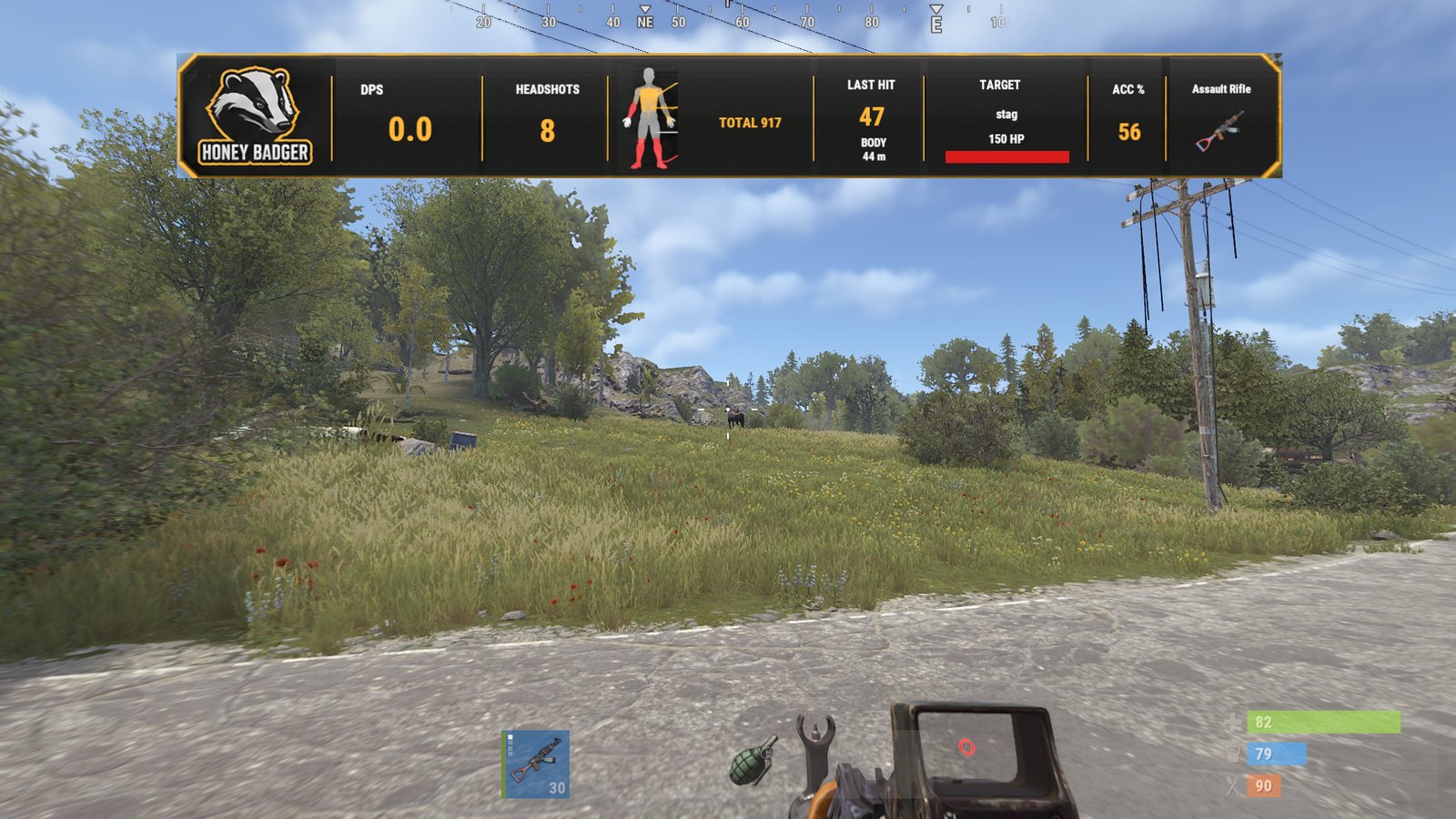
DPS
Damage that landed in the last five seconds, divided by five. The window is a config value.
Headshots
Landed headshots this session.
Body
The silhouette lights the zones you have been hitting on your targets.
Total
Every point of damage that landed this session, after armour.
Last hit
Damage of the last landed hit, the body zone it struck, and the range in metres.
Target
Who you are hitting, with a health bar that follows the victim. Players by name; Rust's NPCs as Scientist, Heavy Scientist, Tunnel Dweller, Dweller or Bandit; animals and structures by name.
Acc %
Projectiles that landed over projectiles fired. Shotgun pellets count on both sides.
Weapon
The item in your hands, drawn with the game's own icon.
Hit pop
Beside the band, on every landed hit: skull, damage, zone, for under a second. Never in the crosshair.
Landed damage, not the stat sheet
The weapon's damage number is a promise. The band shows what the server actually took off the target.
The hook fires first
Rust raises OnEntityTakeDamage before the hit is applied. The plugin notes the target's health, lets the server apply the hit, and reads the health again on the next server tick. The difference is what landed after armour, headshot multipliers, other plugins and overkill.
Every hit settles once
A second hit on the same target in the same tick settles the first one on arrival; the last hit of the tick settles next tick. Each hit is credited with exactly the health it took.
What never counts
Walls, corpses and yourself. Buildings and deployables are off by default; NPCs, animals and vehicles are config switches.
What it costs the server
The two damage hooks are subscribed only while at least one player has the meter on screen. Inside the hook: no LINQ, no reflection, no string formatting. Labels are rebuilt on one shared timer (0.5 s by default) and a label is re-sent only when its text changed. Player choices are written to disk at most once every three seconds.
Try it before you install it
The plugin runs on our own server. Join, wake up, and the band is on your screen before you type anything.
Honey BadgerRust server
Our own server, running this plugin under Carbon. In the Rust server browser open the Modded tab, tick Show Empty and search Honey Badger.
Direct connect
Press F1 in Rust and run client.connect 216.39.241.155:27915.
What you get
The band on your screen the first time you wake, /dps for the menu, and animals and scientists around the spawn to test it on.
Last verified
27 October 2026, Rust build 2635, Carbon. The frame at the top of this page was captured on that server that day.
Three steps, no restart
Drop one file
Download the zip and put HoneyBadgerDps.cs into oxide/plugins/ (Oxide) or carbon/plugins/ (Carbon). The framework compiles it on the spot. No restart.
Watch the console
Loaded plugin Honey Badger DPS Meter v1.0.1. The config appears as config/HoneyBadgerDps.json, the texts as lang/en/HoneyBadgerDps.json.
Join
The band comes up the first time you wake. Type /dps for the menu. Admins can prove the art loads with /dps probe.
Everything a player or admin can type
/dpschat
Opens the settings menu with the live preview.
/dps on · /dps offchat
Show or hide the meter. Remembered.
/dps art · /dps textchat
Painted band, or a plain text line.
/dps popchat
Hit pop beside the band on or off.
/dps resetchat
Clear this session's numbers.
/dps helpchat
The list above, in game.
/dps probe [https url]chat · admin
Admins: draws one image top centre for 8 s to prove the client loads the art.
bind f7 hbdps.menuF1 console
The menu on a key.
bind f8 hbdps.toggleF1 console
Meter on and off on a key.
Permissions: honeybadgerdps.use (only checked when the config asks for it; admins always pass) and honeybadgerdps.admin (the probe). Grant with oxide.grant user <steamid64> honeybadgerdps.use; Carbon accepts the same command.
config/HoneyBadgerDps.json
As shipped in v1.0.1. Every key is a sentence, so the file reads without this page.
{
  "Meter": {
    "On by default for every player": true,
    "Require the permission honeybadgerdps.use": false,
    "DPS window in seconds": 5.0,
    "Refresh every N seconds": 0.5,
    "Count hits on NPCs (scientists)": true,
    "Count hits on animals": true,
    "Count hits on buildings and deployables": false,
    "Count hits on vehicles, helicopters and Bradley": true
  },
  "Art": {
    "Enabled (false = plain text meter for everyone)": true,
    "Image base URL (https, ends with /)": "https://honeybadger.software/assets/hud/v1/",
    "Image cache tag (change it after replacing the images)": "1",
    "Band distance from the top of the screen (1280x720 units)": 48.0,
    "Band scale": 1.0
  },
  "Hit pop": {
    "Enabled": true,
    "Seconds on screen": 0.9
  },
  "Chat hint the first time a player wakes up": true
}
DPS window
The number on the band is damage landed in the last N seconds divided by N. Five by default.
What counts
NPCs, animals and vehicles on; buildings and deployables off so base raiding does not read as combat. Corpses never count.
Band position and scale
Band distance from the top is in the client's 1280 x 720 units; 48 clears the compass and most status strips. The band is always horizontally centred.
Chat hint
One line the first time a player wakes up each connection: DPS meter is on. /dps opens its settings.
Host the art yourself
Copy the four PNG files to any https host that serves them as image/png with no login and no redirect, set Image base URL to that folder, and bump Image cache tag if you ever replace a file under the same name. Every file, with previews and sizes, is on the art pack page.
Read it, check it, run it
The things a server owner should be able to verify before a plugin touches their box.
No telemetry
The plugin makes no web requests of its own: no analytics, no version checks, no remote switches. The only traffic is each client's image download from the configured art host, which can be yours.
Compatibility recordRust 2635 · Oxide 2.0.7839 · Carbon 2026.10.01
Version 1.0.1: compiled against the Rust dedicated server assemblies (build 2635) under Oxide 2.0.7839 and the Carbon 2026.10.01 production build; loaded on our live Carbon server and on a local Oxide server; 27 October 2026. Each release repeats this check and this line.
LicenceMIT code · licensed art
Plugin code: MIT, the licence file ships in the zip and in the repository. Art: # Artwork licence
Release historyv1.0.1
1.0.1: changelog dated 26 October 2026, published 27 October 2026, first public release. The full changelog is readable before you download.
ChangelogSupport
Open an issue on GitHub, or write to [email protected]. Include the plugin version, the framework and its version, the console lines around the load, and what /dps probe showed.
The ones owners ask first
The band shows numbers but no art
That client could not download the PNGs. /dps probe as admin shows whether the badge loads; /dps text is the fallback for that player. Check the host serves image/png over https with no login.
DPS looks lower than my weapon's damage stat
The band shows damage that landed after armour and multipliers. That is the number that decides fights.
Does it send anything anywhere?
The only traffic is each client's image download from the configured art host. The plugin itself makes no web requests, keeps no analytics and checks for no updates.
Can I move the band?
Up or down and bigger or smaller through the config. It is always horizontally centred under the compass.
Carbon or Oxide?
Both. It was built on a Carbon server and is compiled and loaded under the current Oxide release before every version.
Put a real DPS meter on your server tonight.
Free, one file, MIT code. Install takes less time than reading this page.